Inventor-Revit Compatibility
Introduction
Until now, parts and assemblies were exported to be loaded into a model as separate components. But since the last Inventor 2021 update, support for Revit has grown dramatically, allowing models to be linked in our models to generate them based on the architecture.
Linking in Inventor
The steps to achieve our purpose go in the following order:
- Import CAD files: We will select the .rvt that we want to link. In this example, I will use a model of a wall with a window that I generated in a previous version of Revit.
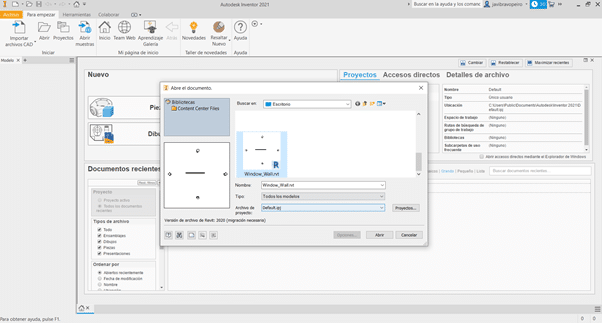
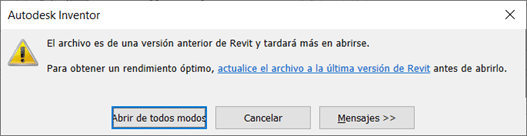
If the Revit file is not version 2021, a message like this will appear:
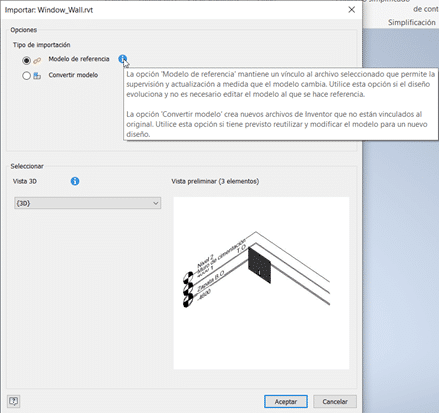
- Import Options: You can choose to keep a reference or convert it to an assembly. You can also choose which view of the project to take into account when opening it.
- Draw referencing: we create a new part and by drawing the sketch projecting links references, we can make sure that if the geometry or position of the window changes, our element adapts.
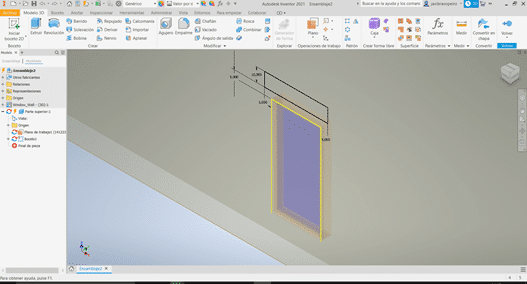
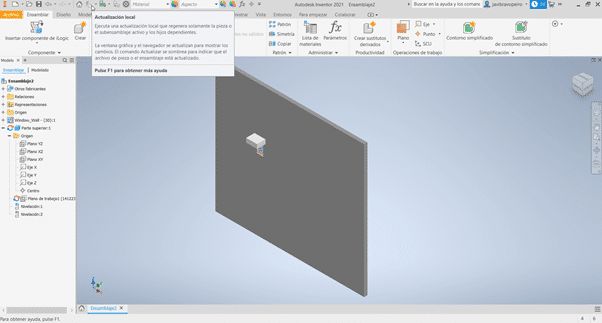
- Changes in the model: we modify the type of the window and its position in the model. In order to see the changes reflected in Inventor, the link must be updated and our model will be updated as in the following image.
Conclusions
With these new functionalities offered by Inventor 2021, the ability to model parts and assemblies taking architecture as a reference, opens up a range of very interesting possibilities for the sector.
In this example we have seen how to link a Revit model to Inventor, but to use the part later, we have several options, such as exporting it as a family, linking it or importing it into the .rvt model as a CAD element.
Another big plus is the ability to make these links to models that are hosted in the BIM360 cloud. This way we can have Revit models and Inventor elements available to work teams.
Have you had any doubts? Do you want to ask us something?
Contact us to advise you on BIM tools and methodology.